
As an affiliate program manager, one of your key responsibilities is handling payments to your affiliates. A crucial part of that process is generating accurate billing for the commissions and bonuses your affiliates have earned. If done manually, billing can be an extremely time-consuming task that often results in errors and delays.
However, leveraging automation allows you to streamline your invoicing process and ensure your affiliates are paid promptly and correctly.
In this article, you will learn the best way to generate bills for your affiliates at scale while saving valuable time and resources. By implementing these best practices, you can provide your affiliates with a superior payment experience that keeps them motivated and engaged with your program.
Why affiliate billing matters more than most teams admit
Billing is not just “paperwork.” It’s your program’s credibility.
Affiliates expect clean receipts for the outcomes they drive. A proper invoice is that receipt: a formal, itemized record of what was earned, when, and under which terms. Clear invoices establish predictable pay cycles, reduce back-and-forth, and prevent “where’s my payment?” tickets that drain your team.
Professionally generated invoices also create an audit trail. When every payout is documented—affiliate entity, period covered, amounts, terms, dates, invoice IDs—disputes turn into quick reconciliations instead of archaeology. Your accounting stays tidy; your partners feel respected; your brand looks like it has its act together. That’s not fluff—it’s retention.
How to create professional affiliate invoices (without babysitting spreadsheets)
Treat invoicing like a repeatable process, not an art project.
- Gather canonical affiliate data once
Legal/business name, address, contact email, tax/VAT IDs, beneficiary details, approved payment methods, and payment terms. Validate this at onboarding and keep it in a single source of truth. Typos here become wire failures later. - Define your period and payable logic
Which dates count? Which conversion statuses are “approved” vs. “pending”? Do you allow negative carryover? Lock these rules so they don’t change mid-cycle. - Calculate with the actual commission plan
Not a one-off sheet. Encode rate cards (CPA/RevShare/Hybrid), tiering, GEO multipliers, and bonuses where your tracking and billing logic live together. When the plan changes, version it with effective dates. - Use a clean, consistent invoice template
Include your company details, affiliate details, invoice number/date, period covered, itemized earnings (by offer/currency), adjustments (bonuses or clawbacks) with reasons, totals, payment method, and payment terms (due date). Keep the layout readable and the math obvious. - Review, issue, follow up politely
Spot-check totals against reports, then send by email and make invoices available in the affiliate portal. If payment is delayed, follow up with a specific status (“Unpaid → Scheduled for DD/MM”) rather than vague reassurances.
The secret: once your data and rules live in software—not in someone’s “master sheet”—everything above gets faster and more accurate.il, you can generate clear and comprehensive invoices for your affiliates to maintain a good working relationship. Let me know if you have any other questions!
The Best Billing Templates for Affiliate Programs
A template designed explicitly for affiliate programs is critical to generate professional invoices for your affiliates.
Here are some of the best options:
Simple Affiliate Billing Template
This basic template includes fields for the invoice number, date, affiliate information, payment terms, itemized fees, and total amount due. It has a simple yet polished design and is easy to customize with your logo and color scheme. The itemized fee section lets you specify details for multiple affiliate transactions on a single invoice.
Affiliate Commission Invoice Template
Geared toward affiliate marketers, this template provides dedicated fields for listing the affiliate’s name and ID, commission percentage, payment method, and pending and paid commissions. It automatically calculates the total commission amount due based on the percentage you enter for each product. You can also add notes or special instructions for the affiliate. The clean layout and intuitive interface make this a great option if you have many affiliates and need to generate invoices efficiently.
Affiliate Program Invoice Template
For larger affiliate programs, this comprehensive template includes an area for program terms and conditions and fields for multiple affiliates, products, and payouts. It does require some setup to customize your program’s terms and conditions and product details.
However, this template allows you to efficiently generate detailed invoices for all your affiliates in a single batch once configured. The summary section at the end automatically totals the amount due for each affiliate and the total for the entire batch.
A specialized affiliate invoice template will make the invoicing process quicker and more accurate. Customize the template with your program and company details before sending it to your affiliates. With an efficient system in place, you can continue building great relationships with your affiliates.
Scaleo Affiliate Software – Best Choice for Billing
If you use use Scaleo to power your affiliate marketing program, our invoicing module is already integrated into all tariff plans.
Scaleo’s platform makes automating affiliate billing efficient and hassle-free. It reduces the time you spend manually inputting affiliate data and calculating commissions, allowing you to focus on other important tasks within your program. Automated affiliate invoicing also minimizes errors and omissions that can damage relationships with your affiliates.
How Affiliate Billing Works in Scaleo?
Scaleo calculates payouts and generates detailed invoices for affiliates. Please note, tat the platform itself does not send out money. The billing functionality can be found in Settings > Billing section.
Some of the features Scaleo offers:
Invoice Generation: There are two types of invoice generation: “By Schedule” and “By Affiliate Request”.
- By Schedule” suits those who pay affiliates on a particular day of the month or week. It offers several frequency options like weekly, bi-monthly, monthly, and quarterly. Invoices can be generated manually or automatically.
- “By Affiliate Request” is used when affiliates request payment themselves. The system generates an invoice upon such requests. Affiliates can specify the amount and add attachments.
Affiliates Billing: The Affiliates Billing section displays information about affiliates’ balances and invoices.
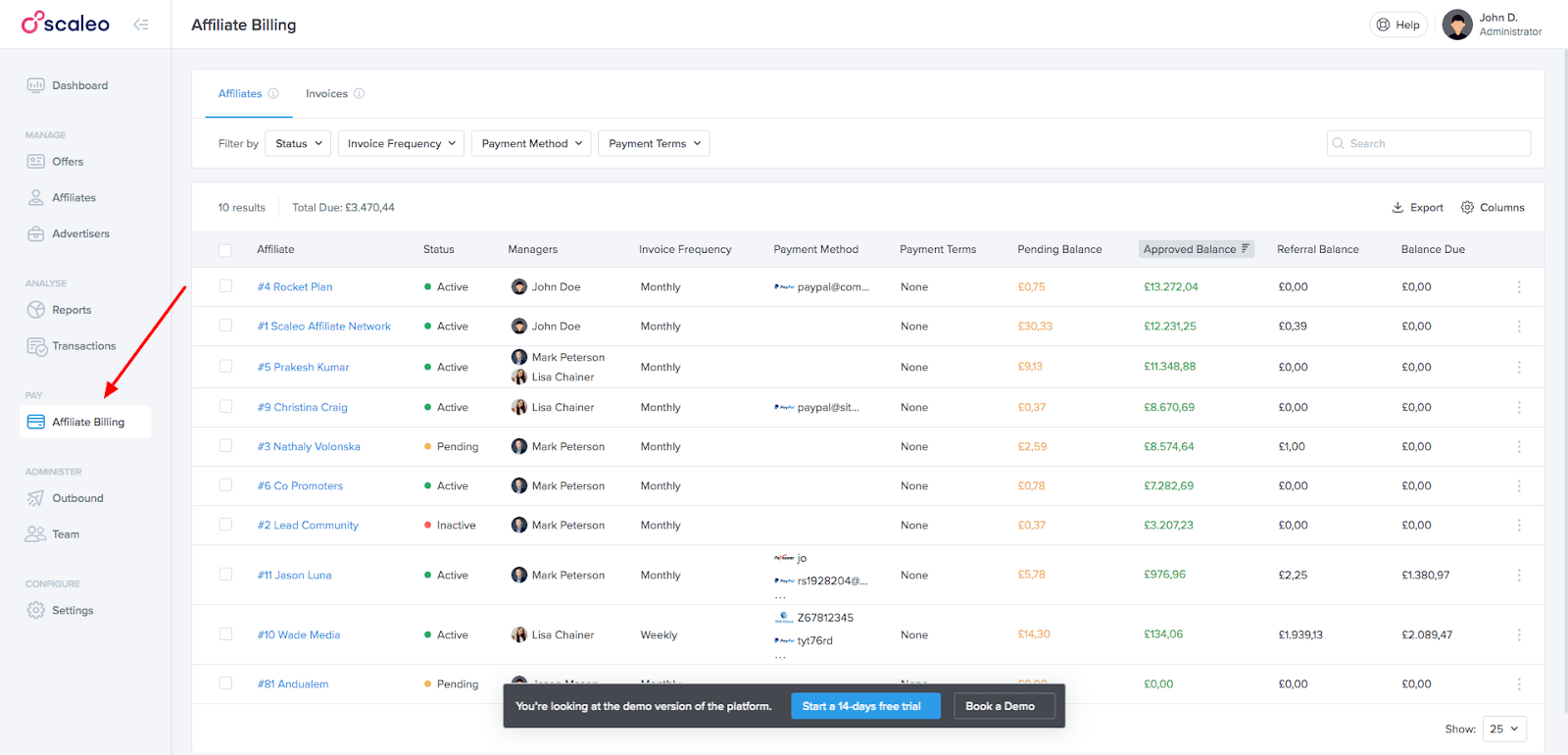
Affiliates Tab: This tab contains a list of all affiliates, their payment methods, balances, and other relevant information. Affiliates can be filtered by status, invoice frequency, payment method, and payment terms.
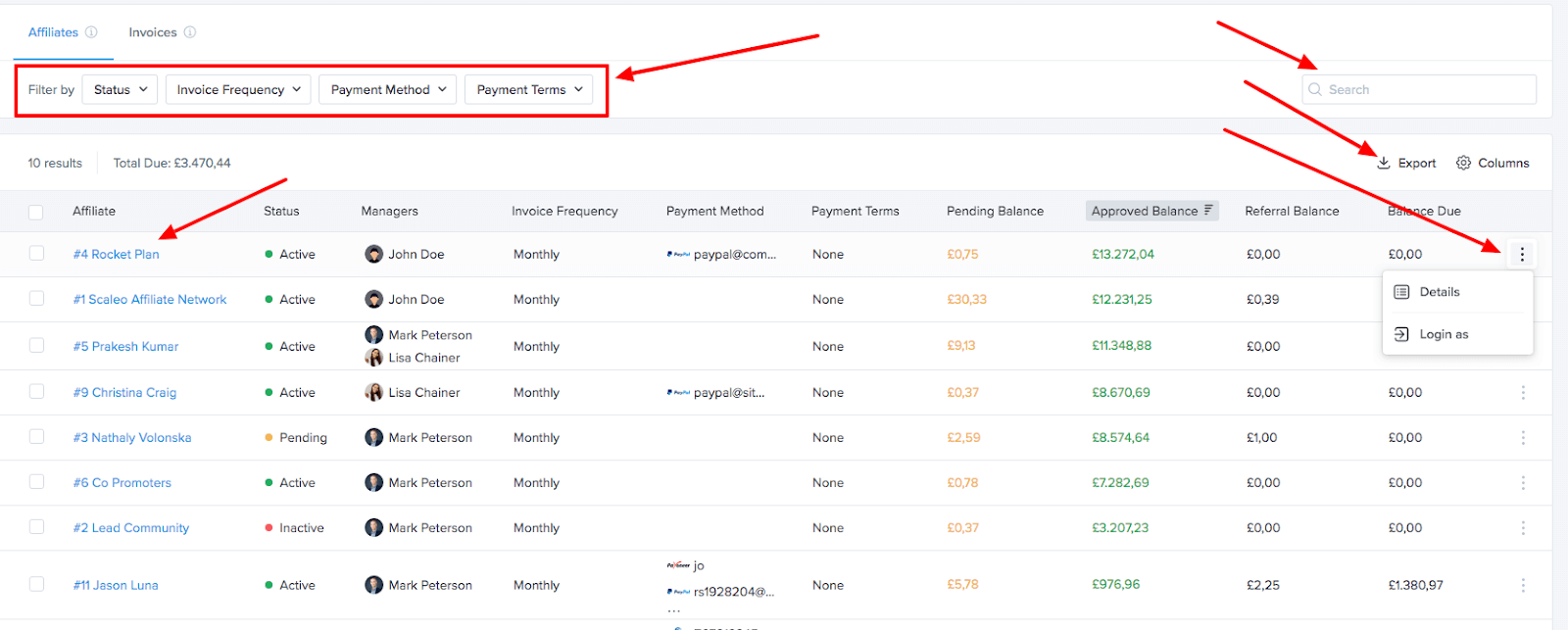
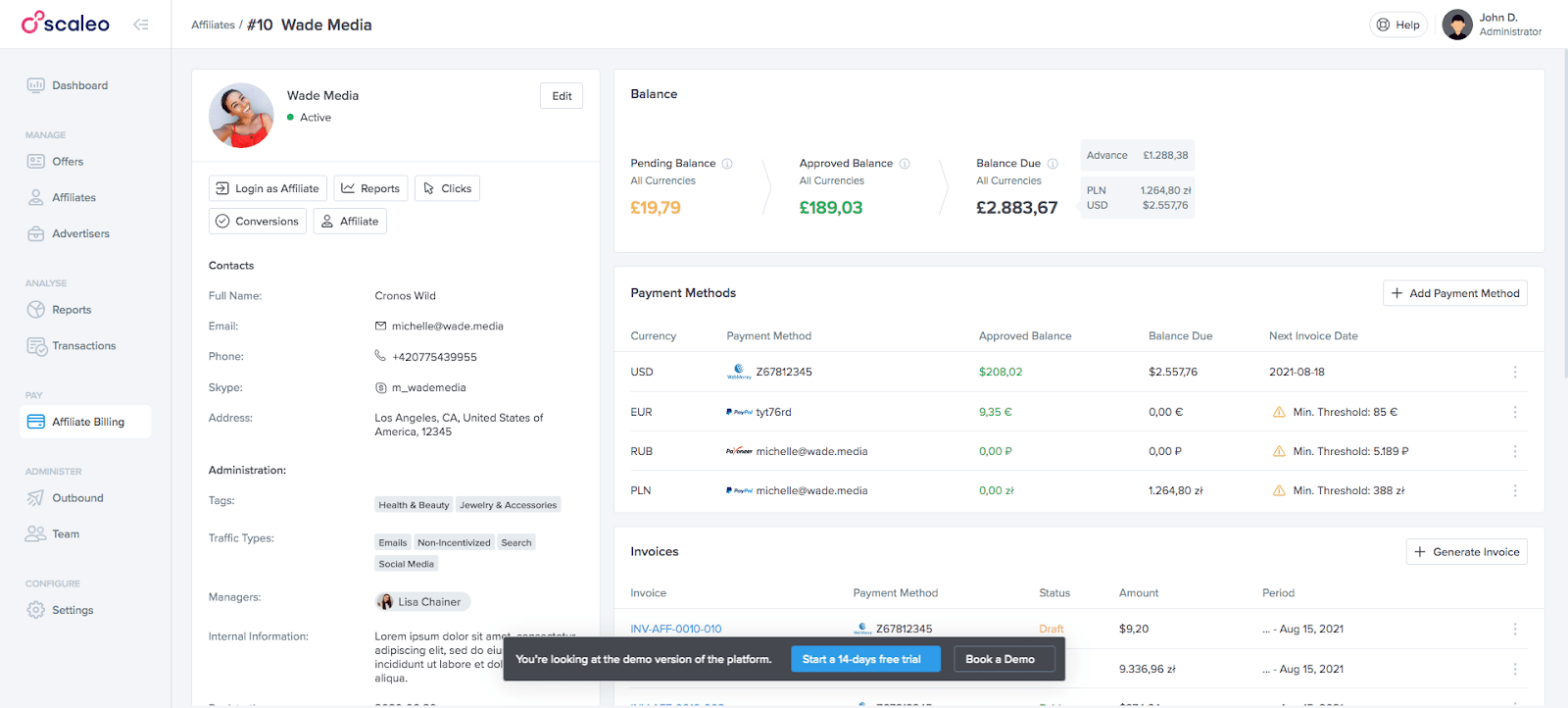
Affiliate’s Details: These include basic information about the affiliate and billing information. Parameters like invoice frequency, invoice generation method, and payment terms can be edited for each affiliate separately.
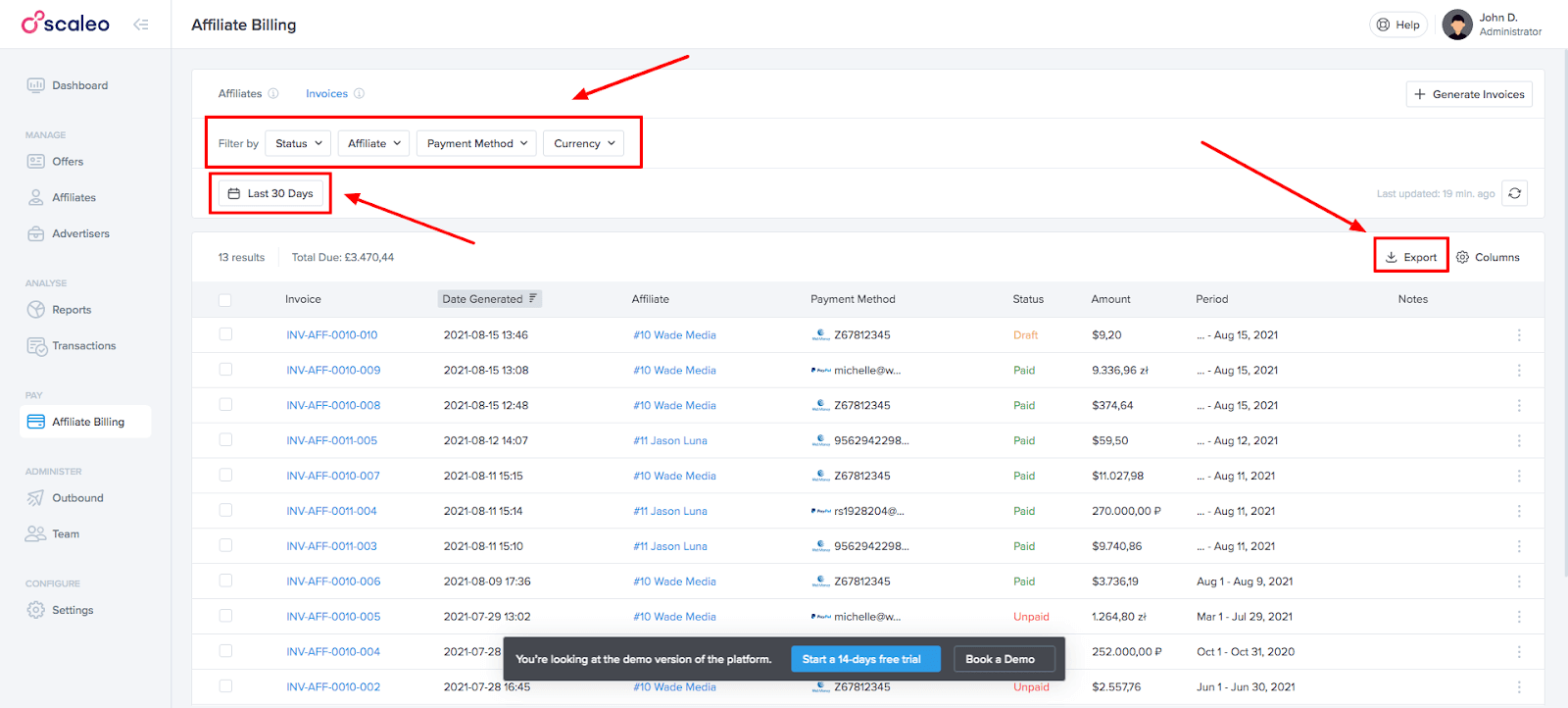
Invoices Tab: This tab contains a list of all invoices created on the platform for the selected period. The list displays information about the invoice like status, date generated, payment method, amount, etc.
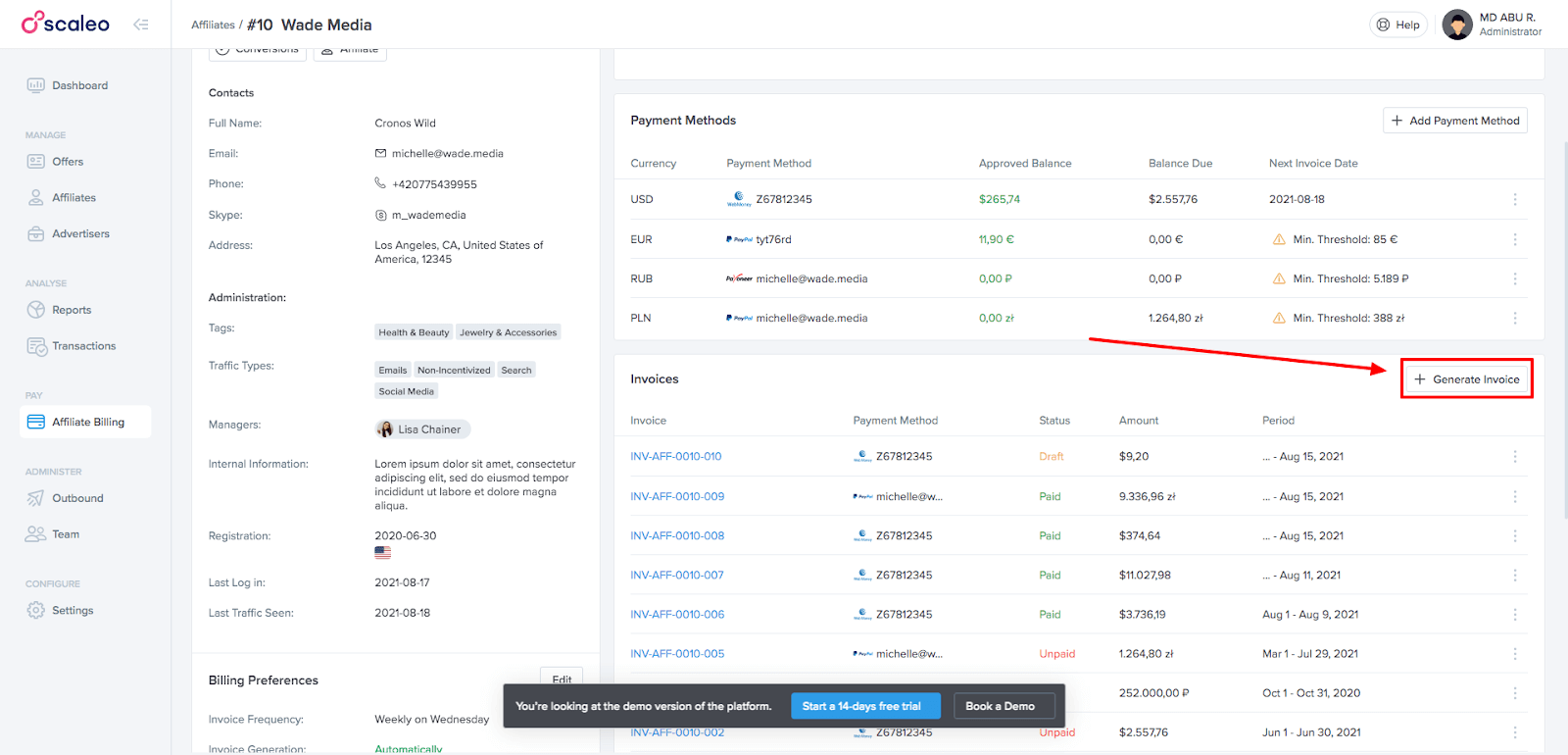
Generating Invoices: Invoices can be generated on the affiliate’s details page and from the list of invoices. Generation can be done for all affiliates at once or for one affiliate. The generated invoice includes conversions for the specified period.
Invoice Details: Once an invoice is generated, it can be viewed in detail in the invoice list. The details include the transactions listed in the invoice. Invoices can be edited or deleted, with some restrictions depending on their status.
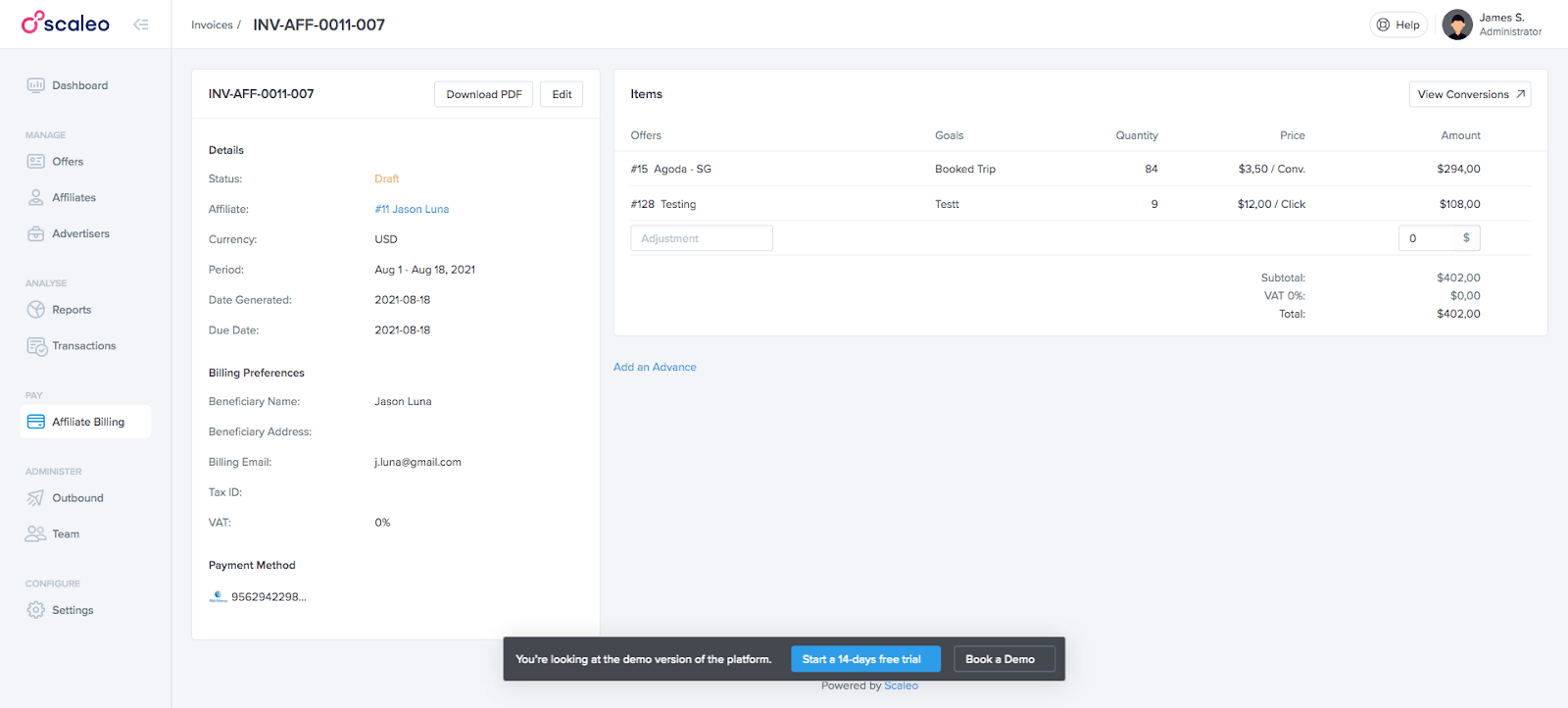
Download PDF: Created invoices can be downloaded in PDF format from the list of invoices or the invoice details.
Reports and Transactions: The system offers filters and breakdowns related to billing in reports and transactions.

Automating your affiliate invoicing through a platform like Scaleo ensures timely, accurate, and detailed invoices that improve transparency and trust between you and your affiliates. Over time, automated invoicing can save significant time and resources within your program operations compared to manual invoicing processes.
Conclusion
When billing runs on spreadsheets, you’re manufacturing trust by hand every month. Move the rules and math into software, and invoicing becomes a 60-minute review: generate, glance, export, pay. Your affiliates get predictable, transparent statements; finance gets clean records; your team gets its time back.
Scaleo’s billing module was built for exactly this: calculate payouts accurately, generate detailed invoices on a schedule or by request, manage statuses and adjustments with audit trails, export PDFs and lists cleanly, and surface billing context across reports and transactions. Payments remain your rails’ job; everything else—modeling, math, and documentation—stays in one place.
If you’re still spending half a day on payout week, you don’t need more caffeine. You need a proper billing pipeline. This is how you build it.
The billing module in Scaleo makes issuing affiliate invoices efficient and reliable. With automated invoices, you have more time to focus on other aspects of your program that drive growth. Give it a try for free for 14 days, no credit card required!